

5 Best NetSuite POS Alternatives for Multi-Location Businesses (With Seamless ERP Integrations)
Daniel Zvi
 175
175
If you're a multi-location retailer or restaurant operator who's frustrated with the NetSuite POS (SCIS) End-of-Life announcement because you need to migrate without losing your backend data, the best option right now is Lightspeed — it offers proven, direct API integrations with NetSuite ERP to keep your complex inventory and accounting synced perfectly without manual entry.
TL;DR
- Lightspeed — Best for complex retail: Lightspeed offers deep, native-feeling integrations with major ERPs to handle multi-location inventory, purchase orders, and supplier management automatically.
- Toast — Best for high-volume restaurants: Toast provides purpose-built restaurant hardware and kitchen display systems that integrate seamlessly with enterprise accounting tools.
- Square — Best for fast deployments: Square allows businesses to deploy new point-of-sale terminals in days rather than months, with thousands of third-party integration apps available.
- Global Payments — Best for enterprise processing: Global Payments delivers scalable, omnichannel payment processing across international locations with highly customizable POS software.
- Epos Now — Best for mixed business models: Epos Now handles both retail and hospitality workflows under one system, making it ideal for venues with gift shops and cafes.
Is Lightspeed a Good NetSuite POS Alternative for Scaling Retail?

Who is Lightspeed actually for?
Lightspeed is built for multi-location retailers who need advanced inventory management and want to avoid the massive disruption of tearing out their backend ERP system. It handles massive catalogs, complex matrix variants, and multi-store transfers effortlessly. If you manage thousands of SKUs across several warehouses and storefronts, this platform is specifically tailored to your operational scale.
 Our top picks for October 2026
 9.5
9.5


 Inventory management
Why would you switch from NetSuite POS to Lightspeed?
Lightspeed is worth switching to if you are being forced off NetSuite POS due to the sunsetting announcement, because it offers robust, pre-built API connectors for NetSuite ERP — something that makes the migration process significantly less painful. You get to keep your existing backend accounting and financial infrastructure entirely intact. Plus, Lightspeed's cloud-based interface is substantially more modern and easier for floor staff to learn quickly.
What can Lightspeed actually do for multi-location retailers?
- Sync inventory automatically: Pushes stock levels, purchase orders, and item costs directly between the POS and your ERP.
- Manage B2B and B2C sales: Handles wholesale pricing tiers and standard retail transactions from the same interface.
- Track multi-store analytics: Generates real-time reports on sales performance and staff metrics across all your physical locations.
- Process custom orders: Allows cashiers to build special orders, layaways, and work orders directly at the register.
- Unify omnichannel retail: Connects your physical store inventory directly to your e-commerce storefront to prevent overselling.
How much does Lightspeed cost?
Lightspeed costs $119/month for the Standard plan when billed annually. There is no free trial, but they offer personalized demos. Compared to the massive enterprise contracts associated with NetSuite POS, Lightspeed's transparent SaaS pricing often results in lower total cost of ownership for multi-location retailers.
→ See our full Lightspeed review or visit Lightspeed directly.
Is Toast a Good NetSuite POS Alternative for Multi-Location Restaurants?
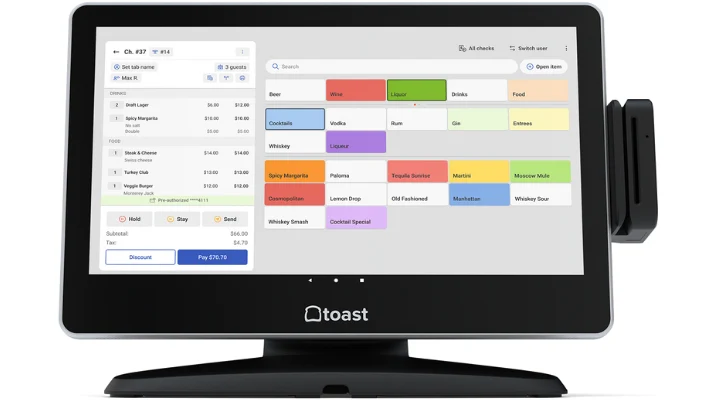
Who is Toast actually for?
Toast is built for high-volume restaurant operators who need enterprise-grade kitchen management and want to avoid the lag and crashes associated with legacy retail-first POS systems. It is entirely hospitality-focused, handling everything from quick-service chains to massive fine-dining groups. You get a system built specifically for the chaos of a commercial kitchen.
Our top picks for October 2026

Why would you switch from NetSuite POS to Toast?
Toast is worth switching to if your food and beverage business is caught in the NetSuite sunset, because it provides purpose-built, spill-proof restaurant hardware and advanced Kitchen Display Systems (KDS) — something NetSuite POS lacked since it was primarily a retail tool. Toast integrates smoothly with enterprise accounting platforms, meaning you can upgrade your front-of-house operations while maintaining strict financial controls in the back office.
What can Toast actually do for multi-location restaurants?
- Route kitchen tickets: Sends specific items to specific prep stations automatically to speed up service times.
- Manage complex menus: Updates pricing, 86'd items, and seasonal specials across all your locations from one central dashboard.
- Process tableside payments: Equips servers with handheld devices to take orders and process cards right at the guest's table.
- Handle online ordering: Syncs native delivery and takeout orders directly to the kitchen without manual third-party tablets.
- Track ingredient-level inventory: Calculates recipe costs and alerts managers when specific raw ingredients run low.
How much does Toast cost?
Toast costs $0/month for their Starter Kit (pay-as-you-go via higher processing fees), or $69/month for the Core plan. There is no free trial. This is a drastically different and more accessible pricing model than traditional enterprise POS deployments, allowing you to scale terminal counts without massive upfront software licensing fees.
→ See our full Toast review or visit Toast directly.
Is Square a Good NetSuite POS Alternative for Fast Migration?
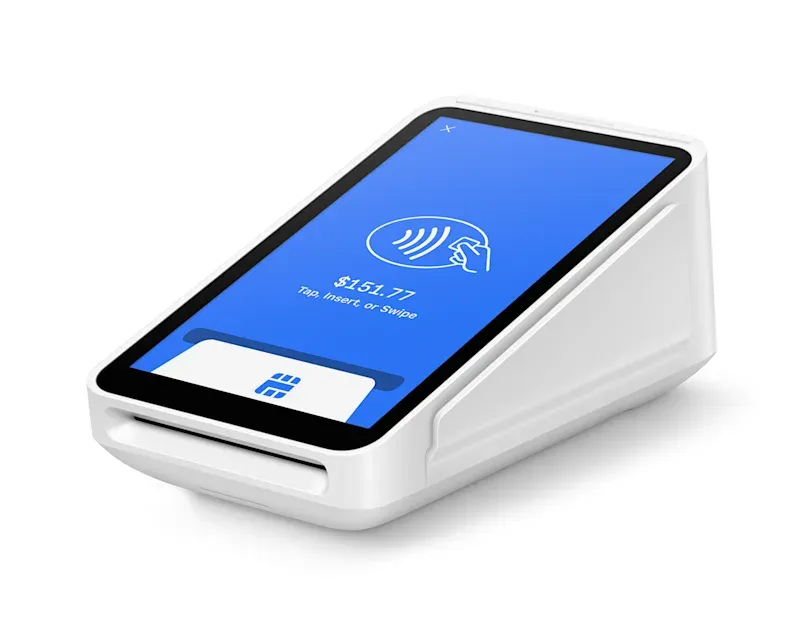
Who is Square actually for?
Square is built for agile business owners who need to deploy a new point-of-sale system rapidly and want to avoid long, complicated integration timelines. It scales beautifully from single pop-up shops to multi-location retail empires. If you are facing a tight migration deadline and need something your staff can learn in five minutes, this is your solution.
Our top picks for October 2026

Why would you switch from NetSuite POS to Square?
Square is worth switching to if you have a tight NetSuite migration deadline, because it requires virtually zero technical setup and relies on a massive App Marketplace for ERP integrations — something legacy enterprise systems strictly control. You simply download the app, log in, and start selling immediately. It completely removes the need for expensive IT consultants during the rollout phase.
What can Square actually do for fast-moving businesses?
- Deploy instantly: Allows you to use standard iPads as full cash registers without proprietary hardware delays.
- Integrate via App Marketplace: Connects to major accounting, ERP, and marketing tools through pre-built third-party bridges.
- Process payments offline: Continues to accept credit card swipes securely even if your store's Wi-Fi goes down.
- Manage team permissions: Controls what specific employees can see, refund, or discount using custom passcodes.
- Build customer profiles: Saves purchase history automatically to help you run targeted email marketing campaigns.
How much does Square cost?
Square costs $0/month for the standard POS app, charging only a flat payment processing fee (usually 2.6% + 10¢ per dip/tap). There is no free trial because the base software is free indefinitely. If you need advanced retail or restaurant features, those premium modules start at $60/month per location.
→ See our full Square review or visit Square directly.
Is Global Payments a Good NetSuite POS Alternative for Enterprise Processing?
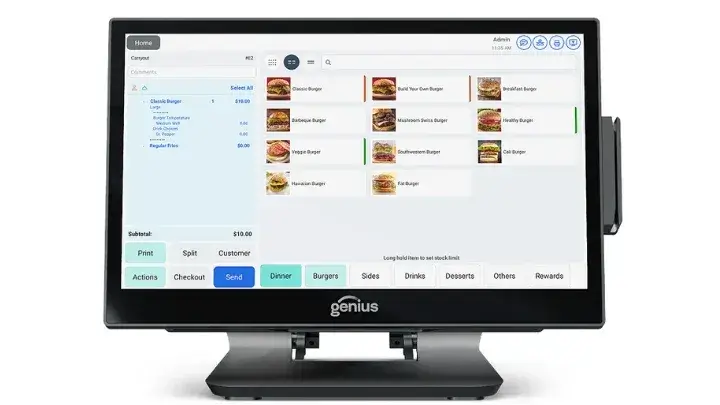
Who is Global Payments actually for?
Global Payments is built for large-scale, international enterprises who need maximum control over their payment processing and want to avoid being locked into rigid, one-size-fits-all SaaS software. It works well for major stadiums, large hotel chains, and multi-national retail franchises. You gain direct access to an acquirer-processor, which means highly negotiable rates at scale.
Our top picks for October 2026

Why would you switch from NetSuite POS to Global Payments?
Global Payments is worth switching to if you operate at a massive volume, because it combines highly customized POS software architectures with direct wholesale payment processing rates — something standard out-of-the-box POS platforms cannot offer. They have the engineering resources to build custom API bridges directly into your specific instance of NetSuite ERP, ensuring zero data loss during your migration.
What can Global Payments actually do for enterprise operators?
- Negotiate processing rates: Leverages your high sales volume to secure lower interchange-plus pricing models.
- Unify global commerce: Consolidates reporting across different countries, currencies, and tax jurisdictions into one view.
- Customize POS interfaces: Allows enterprise IT teams to tailor the register screens specifically to their operational workflows.
- Protect sensitive data: Uses advanced point-to-point encryption (P2PE) to keep your business off the PCI-compliance hook.
- Bridge legacy systems: Connects modern cloud payment terminals to older, established backend mainframes and ERPs.
How much does Global Payments cost?
Global Payments pricing is entirely quote-based and tailored to your business volume. There is no standard monthly fee published, and there is no free trial. Because they operate at the enterprise level, your costs will depend entirely on your processing volume, terminal count, and the complexity of your ERP integration requirements.
→ See our full Global Payments review or visit Global Payments directly.
Is Epos Now a Good NetSuite POS Alternative for Mixed Retail and Hospitality?
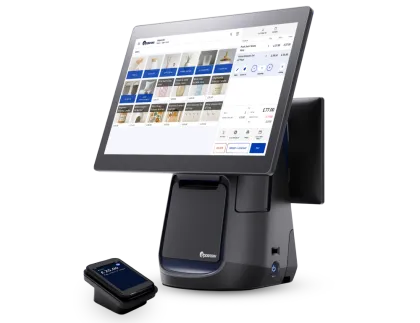
Who is Epos Now actually for?
Epos Now is built for operators managing mixed-use venues who need flexibility and want to avoid buying two completely different POS systems for their retail and food spaces. It handles both environments effortlessly. If you run a museum with a gift shop and a cafe, or a golf course with a pro shop and a restaurant, this system bridges that gap.
Our top picks for October 2026

Why would you switch from NetSuite POS to Epos Now?
Epos Now is worth switching to if you run diverse revenue streams, because it toggles seamlessly between retail scanning workflows and restaurant table-mapping workflows — something NetSuite POS struggled to do natively. It connects to hundreds of external apps, allowing you to easily map your complex sales data into your continued ERP or accounting software.
What can Epos Now actually do for mixed-use venues?
- Toggle operational modes: Switches the register interface from retail barcode scanning to restaurant floor plans instantly.
- Manage hybrid inventory: Tracks both discrete retail items (like t-shirts) and recipe-based ingredients (like coffee beans).
- Connect to accounting tools: Syncs daily sales data to major bookkeeping platforms to eliminate manual end-of-day math.
- Run on any device: Operates smoothly on iPads, Android tablets, Mac, or PC hardware you might already own.
- Scale effortlessly: Adds new registers or new physical locations with a few clicks in the cloud back-office.
How much does Epos Now cost?
Epos Now costs $39/month when billed annually. They occasionally offer heavy discounts on hardware bundles, and they do provide a 30-day free trial. This aggressive pricing makes it a highly cost-effective replacement for businesses fleeing the expensive licensing fees of legacy enterprise systems.
→ See our full Epos Now review or visit Epos Now directly.
NetSuite POS Alternatives Comparison Table
| Alternative | Best For | Starting Price | NetSuite ERP Integration? | Free Trial? |
| Lightspeed | Complex retail & inventory | $119/month | Yes (Native & Third-Party) | No |
| Toast | High-volume restaurants | $0/month (Pay-as-you-go) | Yes (Third-Party APIs) | No |
| Square | Fast deployment & agility | $0/month + processing | Yes (Via App Marketplace) | N/A (Free Software) |
| Global Payments | Enterprise processing volume | Custom quote | Yes (Custom API Bridges) | No |
| Epos Now | Mixed retail and hospitality | $39/month | Yes (Via App Connectors) | Yes (30 Days) |
Comparison of NetSuite POS alternatives for migrating enterprises, updated June 2026.
Frequently Asked Questions
Q: Do I have to switch from NetSuite ERP if NetSuite POS is ending?
A: No, you do not have to abandon NetSuite ERP just because NetSuite POS (SCIS) is reaching End-of-Life. Many modern POS platforms offer API connectors and middleware integrations that push your real-time sales and inventory data directly into your existing NetSuite ERP database.
Q: How long does a NetSuite POS migration take?
A: A full enterprise POS migration from NetSuite typically takes anywhere from 30 to 90 days, depending on the complexity of your inventory and the number of physical locations. Systems like Square can be deployed in days, while complex, API-heavy integrations with platforms like Lightspeed require dedicated testing phases to ensure data flows correctly.
Q: Does Lightspeed integrate directly with NetSuite ERP?
A: Yes, Lightspeed connects to NetSuite ERP through several proven integration partners and middleware platforms like Celigo or Boomi. This allows you to sync complex matrix inventory, customer profiles, and purchase orders automatically without manual data entry.
Q: Is Toast compatible with enterprise accounting software?
A: Yes, Toast integrates seamlessly with major enterprise accounting and ERP systems via third-party integration platforms like xtraCHEF. This ensures that your daily restaurant sales, labor costs, and ingredient-level inventory metrics map perfectly to your general ledger.
Q: What happens to my historical data when NetSuite POS shuts down?
A: You must export your historical sales, customer, and inventory data from NetSuite POS via CSV files before the official sunset date to prevent data loss. Your new POS provider's onboarding team will then format and import that historical data into your new system so you retain your business history.
Which NetSuite POS Alternative Is Right for You?
The NetSuite POS (SCIS) sunset is incredibly frustrating for enterprise operators who relied on the native connection between the register and the back office. Tearing out a POS system means retraining staff, risking data loss, and navigating complicated new API integrations to keep your accounting intact. You need a system that plays nicely with robust ERPs without slowing down your cashiers. Thankfully, the enterprise software space has evolved — and so should your strategy.
Your best move depends entirely on your industry. Lightspeed is the powerhouse choice for multi-location retailers needing deep inventory matrixing. Toast completely dominates the restaurant space with spill-proof hardware and advanced kitchen routing. Square is your lifesaver if you have a tight migration deadline and need to deploy immediately. Global Payments gives multi-national giants the custom architecture and negotiable processing rates they require. Epos Now perfectly bridges the gap for operators managing both retail shelves and restaurant tables in the same building.
If you're managing complex retail inventory across multiple warehouses and need a rock-solid ERP connection, Lightspeed is probably your best bet.
If your business is entirely food and beverage and you need kitchen display systems that never crash, Toast handles that better than anything else on this list.
If you're facing a sudden migration deadline and don't have an IT team to manage the rollout, Square will get your registers ringing faster than the rest.
If you operate globally and want direct control over your payment processing margins at scale, Global Payments is the enterprise partner you need.
Ready to dig in?
- 👉 Lightspeed Review — https://top-posproviders.com/reviews/lightspeed/
- 👉 Toast Review — https://top-posproviders.com/reviews/toast/
- 👉 Square Review — https://top-posproviders.com/reviews/square/
- 👉 Global Payments Review — https://top-posproviders.com/reviews/global-payments/
- 👉 Epos Now Review — https://top-posproviders.com/reviews/epos-now/
Liked this article?
Daniel Zvi
Smart Recommendations


Thank you!